I bought a virtual Visa credit card from Paycardshop and successfully verified my paypal account.
Right now the price of a virtual Visa is $20 USD. After placing an order, I submitted a ticket and got my card within 24 hours. The card was accepted in paypal.
I selected Paycardshop because of their low prices. They accept lots of payment methods as below:
- E-Gold
- E-Bullion
- I-Wallet
- Moneybookers
- Paypal
- PayPay
- Bidpay (FEDEX/DHL/UPS only)
- Epay
- EWalletPlus
- CashU
- UKash
- Credit Card (via PayPal)
- WireCard
- Alertpay
- OneCard
- Pecunix
- Western Union
- MoneyGram
- Bank Wire SWIFT
- Bank Wire IBAN
- Cash at Bank of America
- Cash at CitiBank
If you don't have a credit card and want to buy something online, try Paycardshop .
Wednesday, November 28, 2007

Monday, November 26, 2007
A Proxy Script for Webmaster
Proxono is a web HTTP proxy written in PHP used mainly to bypass filter that stop people from visiting certain blocked sites. Proxono could be used to surf the internet anonymously without leaving any traces of the original IP address behind or itcould be used in any work or school environment that does not allow the employees or students to visit sites that have been blocked by the filters.
Features of Proxono:
Curl downloading - makes everything run faster and smoother
Authentication Support - login to secure sites via curl
Admin Panel - edit any of the options to make a morecustom proxy
Plugin system - ability to add a lot more features to your proxy
Browsing options - choose options on how to browse proxied pages
Doawload address at: http://proxono.com/
Features of Proxono:
Curl downloading - makes everything run faster and smoother
Authentication Support - login to secure sites via curl
Admin Panel - edit any of the options to make a morecustom proxy
Plugin system - ability to add a lot more features to your proxy
Browsing options - choose options on how to browse proxied pages
Doawload address at: http://proxono.com/
Monday, November 19, 2007
[Video] How to use assban.com SSL proxy IP list
This is a video showing how to use assban.com daily SSL proxy IP list.
Related blog post:
http://aplusproxy.blogspot.com/2007/11/view-blocked-sites-with-random-ip-proxy.html
Related blog post:
http://aplusproxy.blogspot.com/2007/11/view-blocked-sites-with-random-ip-proxy.html
Friday, November 16, 2007
Live Web Proxies
New Web Proxies
http://www.geo101.info/
http://www.eng101.info/
http://www.pe101.info/
http://www.psy101.info/
http://www.ma101.info/
http://www.it101.info/
http://www.sci101.info/
http://www.uni101.info/
http://www.kk101.info/
http://www.abc101.info/
http://www.arts101.info/
http://07nov15-8.top-tub.com/
http://www.number107.info/
Proxy With SSL Protocol
https://www.stupidcensorship.com/cgi-bin/nph-surf.cgi
https://zarafe.com/
http://www.geo101.info/
http://www.eng101.info/
http://www.pe101.info/
http://www.psy101.info/
http://www.ma101.info/
http://www.it101.info/
http://www.sci101.info/
http://www.uni101.info/
http://www.kk101.info/
http://www.abc101.info/
http://www.arts101.info/
http://07nov15-8.top-tub.com/
http://www.number107.info/
Proxy With SSL Protocol
https://www.stupidcensorship.com/cgi-bin/nph-surf.cgi
https://zarafe.com/
Saturday, November 10, 2007
View Blocked Sites With Random IP Proxy
Step 1: Please visit http://www.assban.com/newip.php and get daily updated IPs.
Step 2: Click on a link like https://ip/ . For IE6 and Firefox users, you may have to accept the Server-Certificate. For IE7 users, IE7 will block the site but you can ignore the secure warning and continue to browse.
Step 3: You will come to a website written in Chinese. They use SSL and random IP technology to anti the Internet censorship in China. (Figure 1)
 Step 5: Type in http://www.google.com in the box and click the asian button next to it, it will bring you to google. Then when you are at google everything you search in google will be unblocked . (Figure 3)
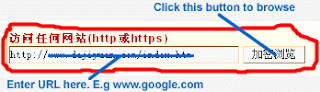 Step 6: It's done! You can unblock your favorite sites now! For test purposes, you can try
Step 2: Click on a link like https://ip/ . For IE6 and Firefox users, you may have to accept the Server-Certificate. For IE7 users, IE7 will block the site but you can ignore the secure warning and continue to browse.
Step 3: You will come to a website written in Chinese. They use SSL and random IP technology to anti the Internet censorship in China. (Figure 1)

 Step 5: Type in http://www.google.com in the box and click the asian button next to it, it will bring you to google. Then when you are at google everything you search in google will be unblocked . (Figure 3)
 Step 6: It's done! You can unblock your favorite sites now! For test purposes, you can try
 https://122.124.135.220/
https://24.225.94.229/
https://59.104.154.223/
https://59.112.235.220/
If assban.com has been blocked by your network admin, please join http://groups.google.com/group/daily_ip to get fresh and working IPs.
Friday, November 9, 2007
A new google proxy group
I Just setup a google group - http://groups.google.com/group/daily_ip
Fresh proxies will be updated there.
Trick and tips on how to use SSL Proxies to surf on the Internet will be post in the member area.
Go there and join if you're interested.
Fresh proxies will be updated there.
Trick and tips on how to use SSL Proxies to surf on the Internet will be post in the member area.
Go there and join if you're interested.
Subscribe to:
Posts (Atom)
 RSS Feed (xml)